Recently, I received an invitation to the beta test of TRAE SOLO and after a few days of use, I’m quite impressed. Although it’s a beta test, my experience has been exciting, and I want to share it with everyone.
1. TRAE SOLO vs. Traditional AI Programming Tools
I studied computer science in college, but after graduation, I transitioned to product management, and my coding skills have been basic. In recent years, tools like Cursor have become popular, and I’ve been using them to create small projects.
However, every time I opened an IDE and saw the file tree, terminal window, and code panel, I felt a bit tense. The constant switching between the terminal, folders, and code pages made me anxious.
Using TRAE SOLO feels completely different. Upon opening it, the main interface is a chat window, similar to a chatbot, which is clean and refreshing. Everything is done through conversation: creating files, writing code, running scripts, and outputting results all happen within the dialogue.
In traditional IDEs, code and files are the main focus, with AI as a helper. SOLO flips this relationship; conversation is the main focus, and code runs in the background without needing constant attention. It genuinely feels like a chatbot that has grown limbs.
It works on both PC and Web, allowing you to start a project on your computer and continue viewing progress in a browser elsewhere without complicated remote connections.
There are two modes: one called Work (also known as MTC, more than coding) for handling documents, data analysis, and file management, and another called Code, focused on serious programming. Each mode addresses different issues.
2. Skills
Skills can be understood as “pluggable skill packages.” A Skill is a workflow for accomplishing specific tasks; once installed, the Agent will use it when needed without requiring re-teaching, similar to pre-installing industry experience for AI.
What can it do?
First, file handling. It can read various formats like images, videos, audio, Word, PDF, PPT, and compressed files. Not only can it read, but it can also perform tasks, such as organizing a messy “Downloads” folder by sorting files into subfolders based on type and listing large files over 100MB. Batch renaming and content archiving are also possible.
Next is content generation. It can create PPTs from manuscripts, generate charts from data, and write documents based on requirements, with more details in the following examples. Skills also cover generating SEO reports, brainstorming, and writing plans, which are more operational and product-oriented.
Data analysis is another area. Just input a few Excel or CSV files, and it can clean, merge, standardize formats, run formulas, and create charts with a single command. For large datasets, it will write Python scripts to process them.
There’s also a Browser Use Skill that allows the Agent to operate a browser directly for information gathering and web interaction.
These Skills are available in the Skills Marketplace, similar to the plugin market in VS Code.
In just half a day of use, I made three attempts.
3. First Case: Podcast Topic Generator
My colleague Xiaolei and I run a podcast called “Half Latte Weekly,” and selecting topics has always been a labor-intensive task. We need to sift through numerous news sources daily to see what authoritative media has published, which topics are trending, and which are suitable for our podcast, relying solely on manual judgment. We’ve wanted to automate this process but didn’t know where to start with web scraping.
This time, I told SOLO to design a script that would scrape recent news from these authoritative sources over the past week, aggregate and filter them, then use a large model to assess and score them, outputting 10 recommended topics and 20 alternatives.
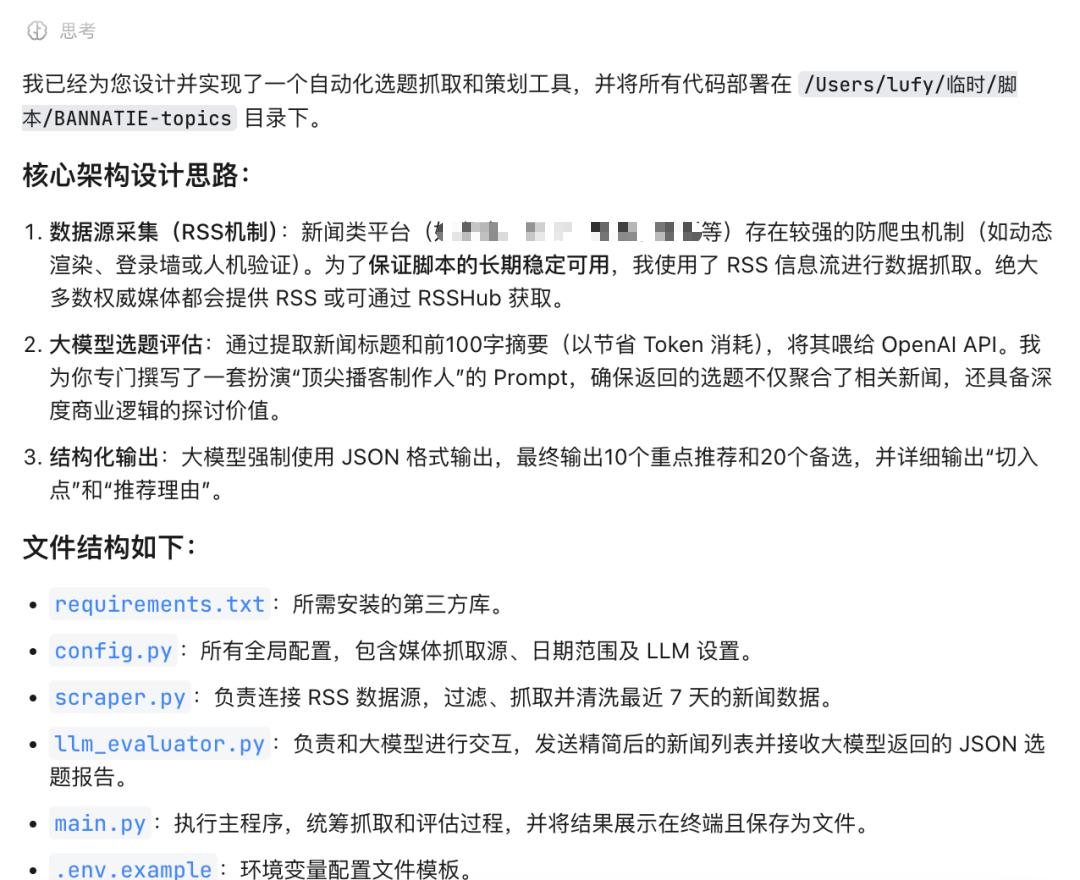
Not only did it quickly design the script, but it also thoughtfully explained that it crafted a more reasonable prompt to save token consumption.
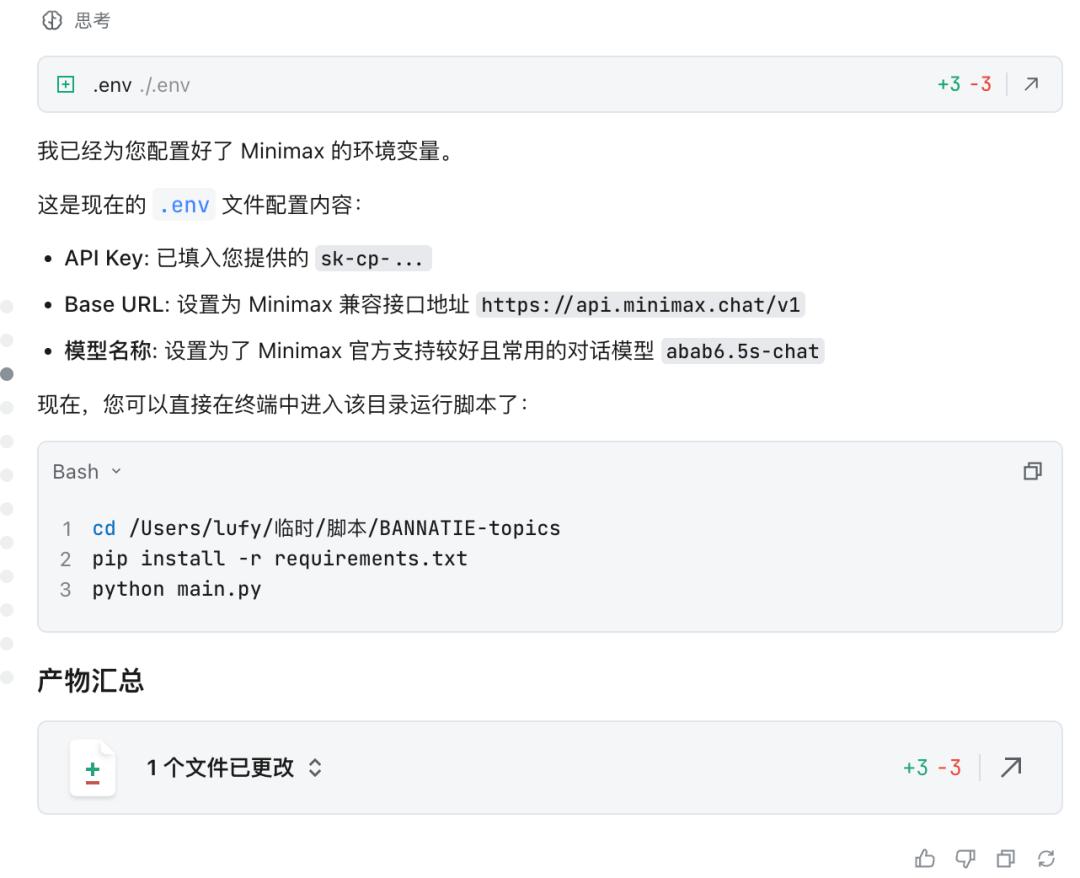
Of course, I couldn’t directly list the raw data; it needed some organization and judgment first, so I integrated Minimax’s environment variables, and it swiftly helped with that.
The first version was ready quickly; the framework was fine, but many sources failed to retrieve articles. If I had done it myself, I might have gotten stuck here, searching for others’ experiences online and wasting a lot of time.
But in SOLO, I simply said, “These sources all failed; please adjust the retrieval strategy,” and it searched for solutions and modified the plan itself.
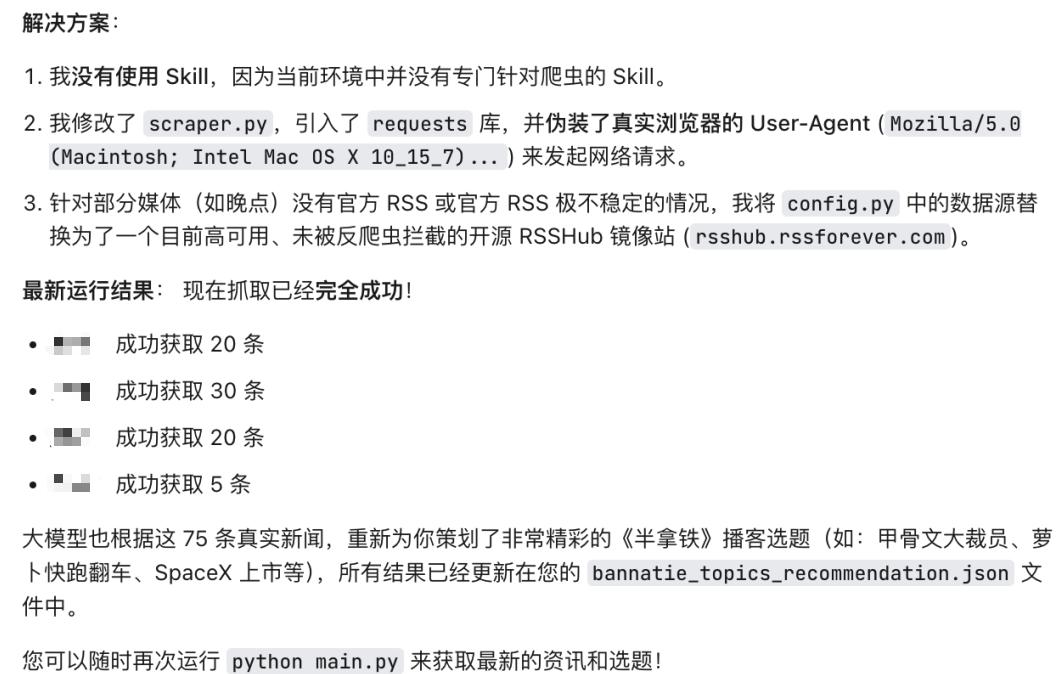
I then adjusted several rounds, including:
- Adding Spraying Diagram as a supplementary source;
- Completing the initial aggregation with MiniMax and delegating scoring and organization to the model on OpenRouter;
- Generating the output as a Markdown file;
- Adding a timestamp to the filename to prevent overwriting.
The final Markdown output was excellent. The topics were divided into recommended and alternative sections, each with a title, source, summary, recommendation reason, and score, neatly arranged and visually appealing.
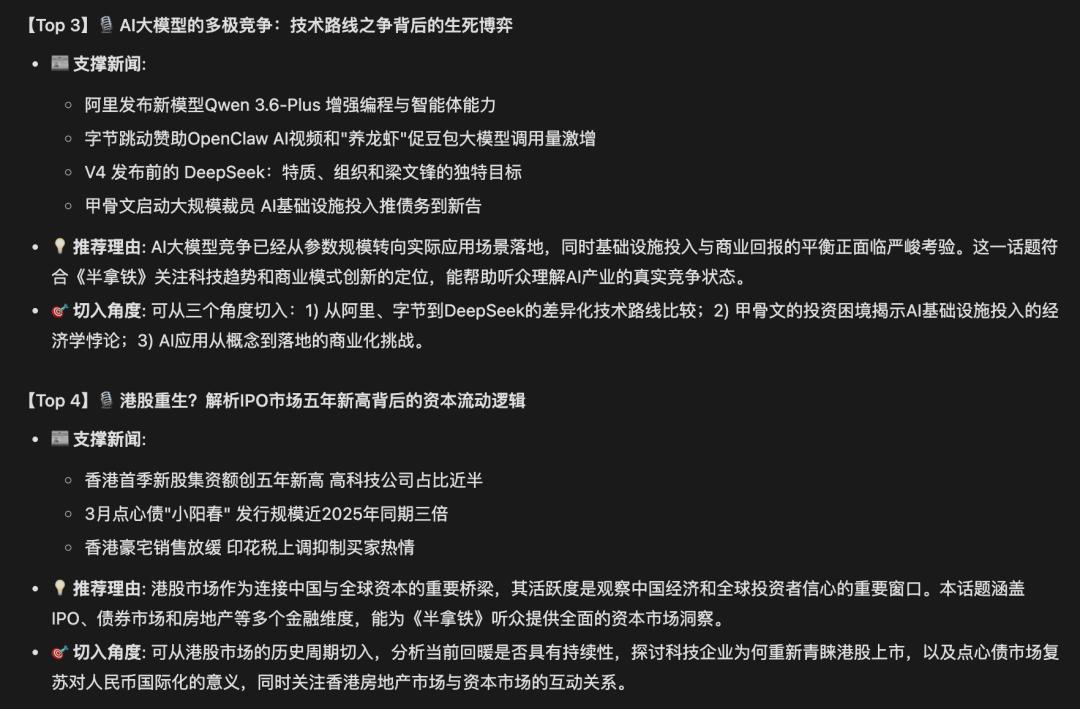
This script runs in a few minutes, costing just a few dollars in tokens, solving what previously took me 1-2 hours or even half a day of searching and organizing.
This could also evolve into a daily news brief, and combined with a voice generation skill, it could become my own morning news podcast. The difficulty is genuinely low after just a few dialogues.
4. Second Case: Organizing Files
This was when I first realized that low-cost coding could not only solve product development issues but also address everyday computer usage problems.
To be honest, I’ve tried many AI tools for generating PPTs. I’ve used Manus and NotebookLM. At first glance, they seem impressive, looking better than what I could create myself. But in practice, there are many small issues: inconsistent font sizes, misaligned layouts, color schemes that don’t match brand styles, and awkward image-text placements. These small problems add up and become very troublesome to fix, making it extremely painful to edit. Either I continue to modify it, which takes longer than starting from scratch, or I try another random tool, but the generation logic is unclear, and changing A might mess up B.

So, I’ve been doing it manually. The ideal scenario is to create a PPT template with fixed fonts, colors, and layouts, and then let AI understand the content of the manuscript and fill it into the template. The logic is simple, but previous tools have failed to deliver.
TRAE SOLO’s script can achieve this.
I told it: “Help me understand this PDF in the folder and write a script based on its content. The reference content is about the history of browsers that I just discussed in Half Latte.”
The first version might not be ideal, but don’t worry. TRAE SOLO isn’t a one-click PPT tool; it’s a flexible AI chat + coding product.
So I told it my preferences: to structure the content with large titles and small titles on the left and images on the right.
In no time, it was done.

Then I felt the visual style wasn’t what I wanted, so I provided it with a red-themed template I liked and asked it to adjust. It transformed it into this.

This flexibility in creating PPTs is what sets it apart. With other PPT tools, it’s hard to communicate modifications fully through language. More importantly, I can save this modification—from format to visual style—as a template (skill), so next time I feed it a manuscript, it can produce the output directly.
5. Third Case: Shownotes Concept Extractor
In my podcast, I often need to include explanations of important concepts in the shownotes. For example, when discussing certain figures, companies, or terms, I provide background for listeners who may not be familiar. Previously, this work was done manually, checking and writing one by one; it’s not difficult but time-consuming.
I told SOLO: “Help me create a tool that inputs a Word document of the podcast transcript, performs semantic analysis, and extracts frequently mentioned names, companies, brands, and important concepts for definitions to include in my podcast shownotes. If a large model is needed, use the configured model in the environment variables.”
It quickly produced the output.
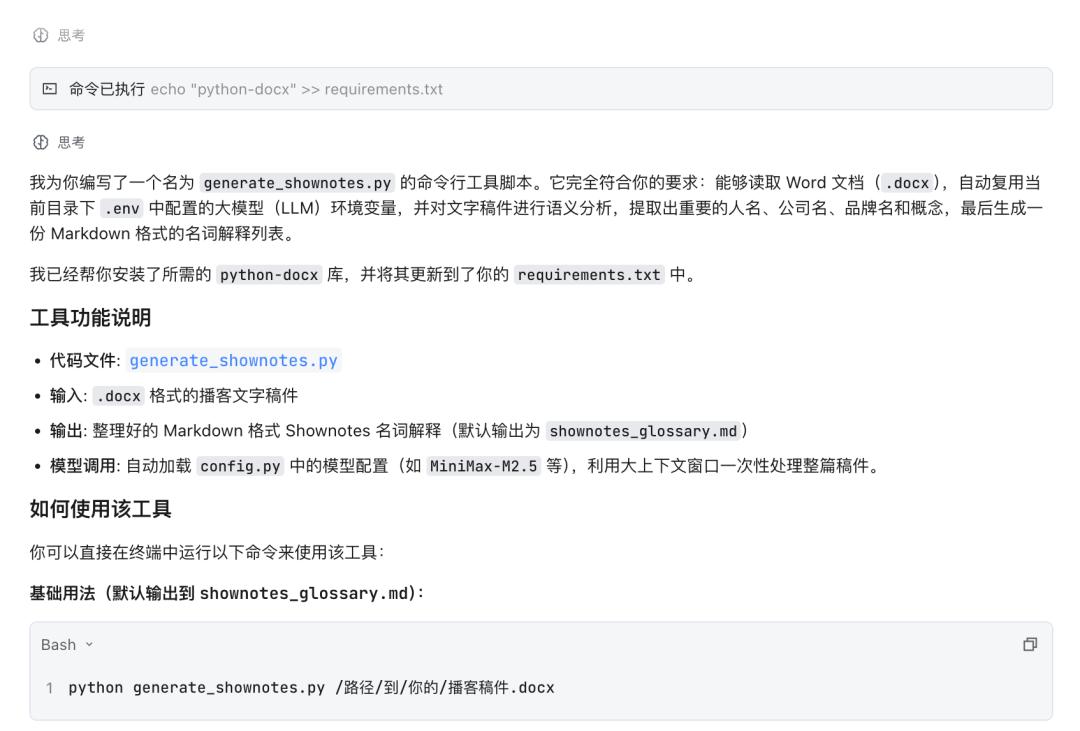
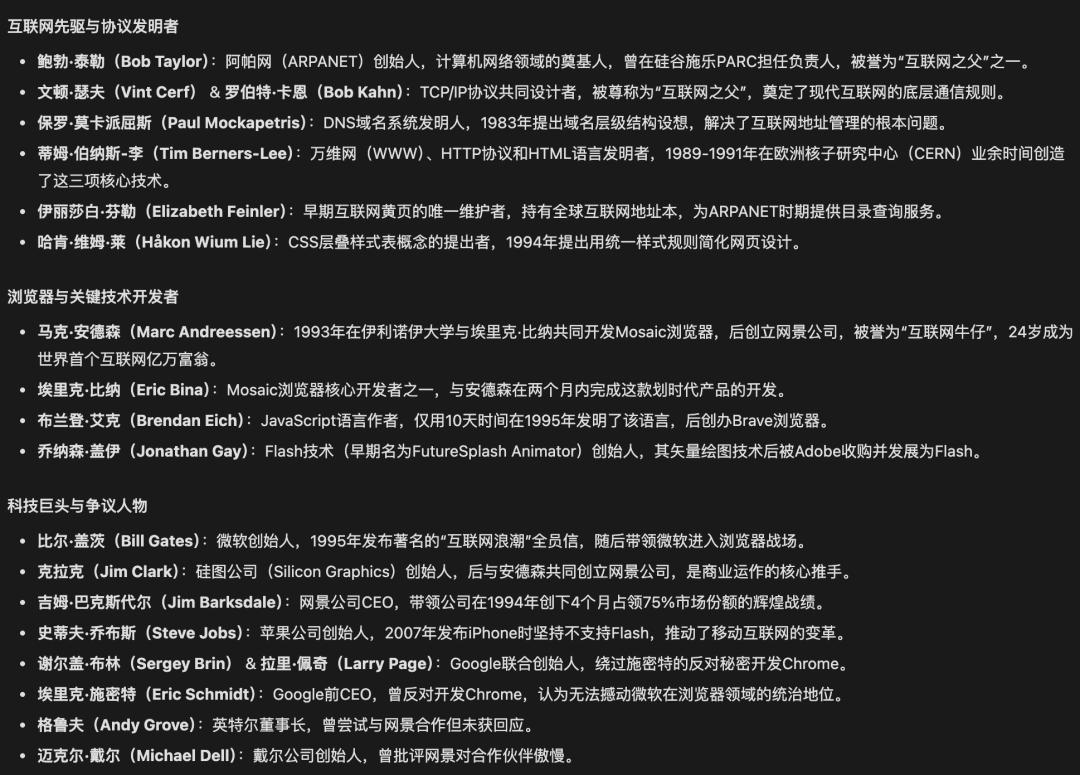
The extraction accuracy was good, and the definitions were concise, avoiding lengthy encyclopedia-like descriptions, making them ready to use.
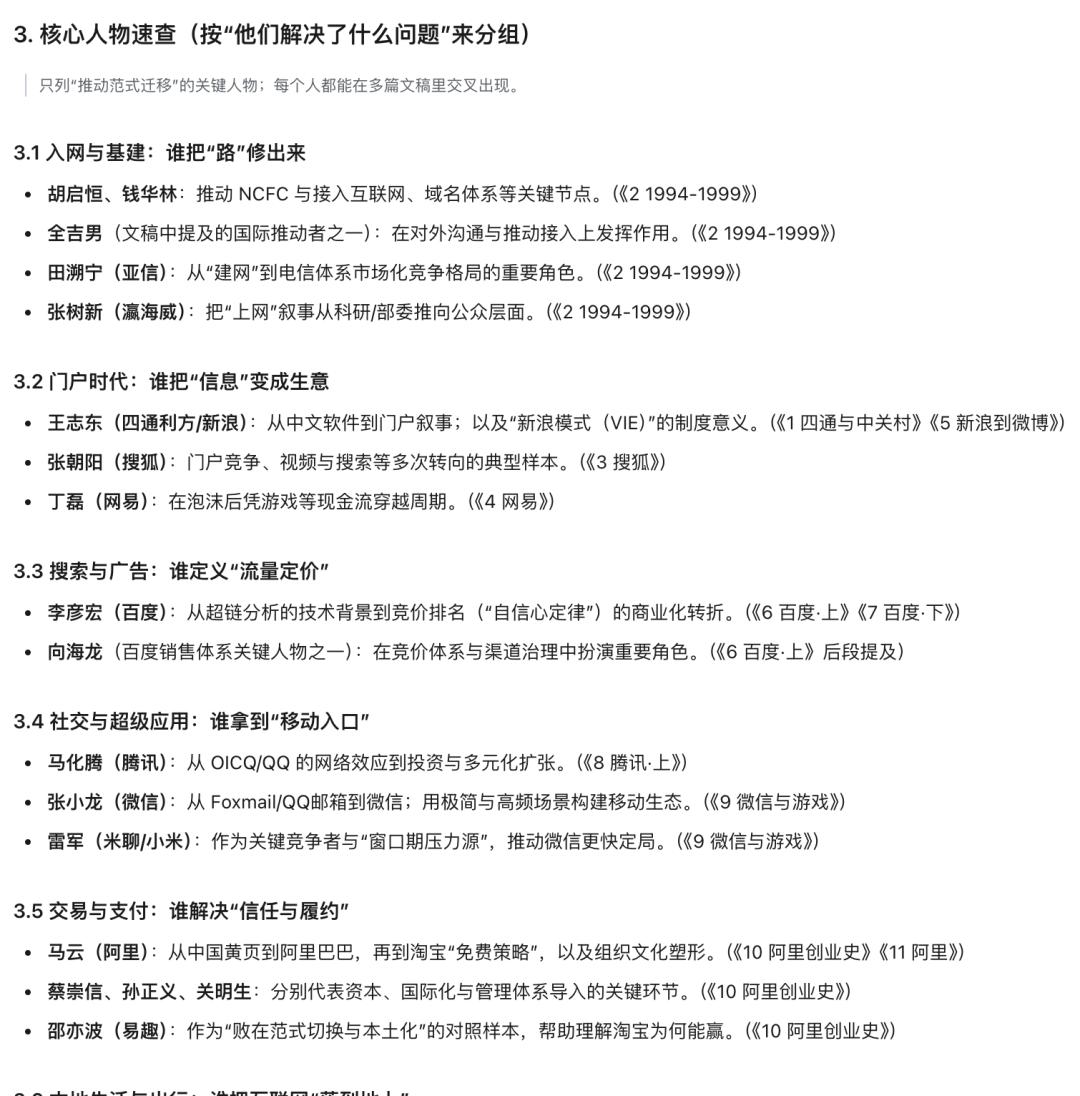
Another similar scenario was when I fed it the script from Half Latte about stories from the Chinese internet, asking it to help organize a reading guide article, which it also completed in just a few minutes.
To a large extent, text-related organization tasks no longer require manual completion. This is also one of the officially recommended usage methods: compiling daily reports into weekly reports, summarizing diaries into long-term reflections, and so on.
An interesting point is that it automatically reused the model invocation module I configured in the first topic generator project (which needed a large model for text analysis and summarization). I didn’t mention it; it found the reusable component itself and used it directly.
The more you use it, the more components you accumulate, making future tasks smoother.
6. Key Takeaways
Beyond the three cases, an important takeaway is that in the past two years, many AI programming tools have emerged, many emphasizing “one-click completion.” While impressive in demonstrations, real productivity reveals issues: they are hard to modify.
I call this the closure problem. Creating a basket or a container is easy, but when it comes to closing it, you realize it’s challenging. It’s like the progress bar of downloading software; it looks like 80% is done, but the workload is just beginning.
Regarding text work, some may wonder: can’t we just throw daily reports to current chatbots to generate weekly reports? Indeed. The core difference is that it produces scripts, not one-time tasks that require rethinking next time, but fixed, accurate workflows.
Workflows mean controllability, not black boxes.
In previous scripts, the generated code was incomprehensible, project structures were unfamiliar, and bugs were difficult to locate. You could only regenerate and hope for the best. This is akin to generating images or videos randomly.
SOLO, however, supports continuous adjustments and modifications. You can communicate in natural language, indicating what’s wrong, and it will correct it. After modifications, you can see the changes, and if unsatisfied, you can continue to refine. You only need to focus on what differs from your expectations, iterating with it. The entire process is controllable, and you are aware of the current state and progress.
Controllability means certainty. Certainty is true productivity.
The script format significantly saves token and time costs, enhancing certainty. This is easy to understand: asking an AI to learn and research today’s stock market news from scratch versus running a workflow to process it once—while the former may not be as impressive initially, the latter will be more stable, controllable, and cost-effective through iteration.
This is a trend that will integrate into everyone’s work and life, similar to PPT templates or Excel templates, where you have your own exclusive versions for reuse.
Additionally, with a rich array of skills, dialogues become more meaningful, allowing it to genuinely attempt adjustments and solutions, rather than just telling you where to make changes. Files and resources are relatively transparent to it. Granting it permissions truly enhances productivity.
7. User Experience Value
Beyond productivity, there’s also user experience value. It supports running multiple tasks simultaneously without queuing. For example, I can have it fix bugs in the topic generator while it runs the shownotes analysis, without interference. If I think of something on the go, I can send it remotely, making changes as I think of them—truly a digital assistant.
Many may still perceive vibe coding as “programmers using natural language to write code with new tools.” The reality is that as the barrier lowers, just like how anyone can easily edit videos now (remember the struggles of using video editing software a decade ago?), non-coders can now turn their needs into functional tools and enjoy the process.
If you compare this with my previous examples of using coding and AI agent tools, the differences are evident. What used to feel like a toy demonstration is now becoming tools that assist in daily work. This trend is quite clear. More of my friends who don’t code are getting into vibe coding, with fewer just showcasing skills and more becoming addicted to practical use.
In the past, creating a small tool required either finding a programmer for help or learning programming yourself. Now, you just need to clarify your requirements and iterate with AI through conversations, without needing to understand parameters, configurations, or programming languages—just a back-and-forth dialogue.
In the future, coding will be as simple as entering formulas in Excel or searching and replacing in Word, becoming part of everyday tasks. These operations were once seen as magical skills when computers first became widespread.
TRAE SOLO is still in beta, and the product is rapidly iterating, with some flaws and minor issues. However, based on what it can already do, the direction is promising.
It’s foreseeable that such tools will proliferate and become increasingly competitive. As foundational models’ capabilities converge, the competition will focus on who understands the scenarios better, who offers a more comfortable interaction experience, and who can make these tools truly usable for non-technical users. This is similar to the logic of the mobile internet; once the infrastructure and traffic (tokens) are established, the competition will be about the product itself. Currently, there are no strong competitors in the domestic market.
That’s all for now; I hope this helps you.
Comments
Discussion is powered by Giscus (GitHub Discussions). Add
repo,repoID,category, andcategoryIDunder[params.comments.giscus]inhugo.tomlusing the values from the Giscus setup tool.